
Apna Ghar Program Application Status
Apna Ghar Program Application Status. Since you have already applied for the Wazir-e-Azam Apna Ghar Scheme, it may have come into your mind as to what is happening with your application. After submitting your application form, there are two very important things that you should know about. First, once you have submitted your application, it becomes very important for you to keep track of the status of your Apna Ghar Scheme application.
It is much easier for the candidates to keep track of their applications without visiting the offices more than once because of the facility provided by the online system. The information regarding your application can be found from the official website of the Apna Ghar program.
What Is the Apna Ghar Application Status?
The Application Status will give you an idea about your application’s status related to housing finance. Once you submit your application, it may go through various stages before a final decision is taken.
During this time, the concerned bank or financial institution may verify your personal details, documents, income, and eligibility. Thus, your application status may keep changing based on these verifications.
Therefore, it would be a good idea to frequently check your status. In case the authorities require any other document or information from you, you will be able to take immediate action.
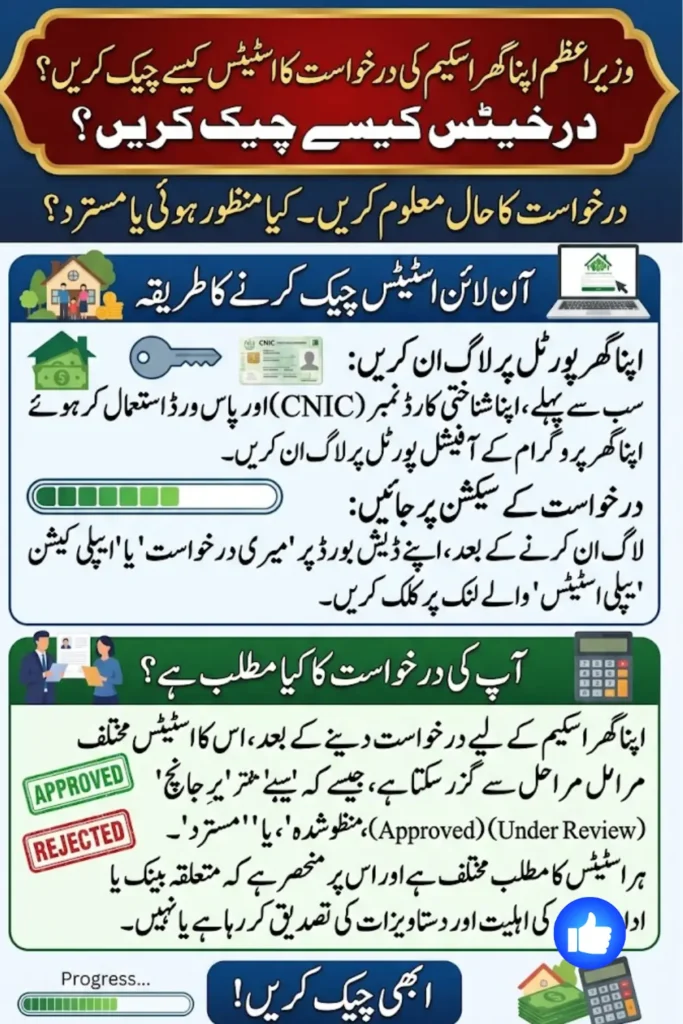
How to Check Program Application Status Online
Checking your application status online is a simple process. Follow the steps below to see the latest update.
Step 1: Visit the Official Apna Ghar Program Portal
First, open the official Apna Ghar Program website using your mobile phone, tablet, or computer. Make sure you are using the official website and not an unofficial page.
Look for the applicant login option on the website.
Step 2: Log In to Your Account
Enter the details you used when creating your account. These may include your:
- CNIC number
- Password
- Security or verification code
After entering the required information, click the Sign In button.
Step 3: Open Your Applicant Dashboard
Once you successfully log in, you should be taken to your applicant dashboard. This is where you can find information related to your application.
Take a moment to review the available options and look for your application details.
Step 4: Select the Application Status Option
Find the section labelled My Application, Application Status, or a similar option. Click on it to view the current progress of your application.
Step 5: Check the Latest Update
Your current application status should appear on the screen. Read the information carefully to understand whether your application is still being processed or whether any action is required from your side.
Different Apna Ghar Application Status Meanings
Your application may show different status messages during the processing period. The exact wording can vary depending on the stage of your application.
Pending
A pending status generally means that your application has been received but the review process has not yet been completed.
Under Review
This usually means that your application is being checked. The relevant institution may be reviewing your documents and eligibility information.
Verification in Progress
At this stage, the information and documents you provided may be undergoing verification. You may need to wait until the required checks are completed.
Approved
An approved status generally means that your application has successfully passed the required review process. You should carefully follow any instructions provided for the next stage.
Rejected
If your application is rejected, check whether the portal provides a reason. If there is an error or missing information that can be corrected, follow the official instructions before taking further action.
Additional Documents Required
This status means that the reviewing authority may need more information or documents from you. Check your account carefully and provide the requested documents as soon as possible.
Why Should You Check Your Application Status Regularly?
Regularly checking your Apna Ghar Application Status can help you stay updated throughout the process. It can also help you:
- Know the latest progress of your application
- Find out if additional documents are required
- Respond quickly to requests from the relevant authority
- Avoid unnecessary delays
- Know when a decision has been made
- Prepare for the next step after approval
You do not need to check the portal every hour. Checking it periodically is usually enough to make sure you do not miss an important update.
Why Can an Application Take Longer to Process?
The processing time can vary from one applicant to another. There may be several reasons why an application takes longer than expected.
Some common reasons include:
- Missing documents
- Incorrect personal information
- Issues with CNIC details
- Verification of income or employment
- Bank or financial institution checks
- A large number of applications being processed
- Technical problems with the online system
If your application has been showing the same status for a long time, check the official portal for any new instructions or contact the relevant official support channel.
Documents You May Need During the Process
Depending on your application and circumstances, you may be asked to provide additional documents. These could include:
- Valid CNIC
- Proof of income
- Salary certificate, where applicable
- Bank statements
- Employment information
- Property-related documents
- Other supporting documents requested by the relevant authority
Always provide clear and accurate documents. If you are asked to upload a document, make sure the information is readable and matches the details in your application.
Can You Check Your Status Without Logging In?
Applicants generally need to access their account to view private application information. Logging in helps protect your personal details and prevents unauthorised people from accessing your application.
If you have forgotten your password, look for the Forgot Password option on the official login page and follow the instructions provided there.
What to Do If You Cannot Log In
Sometimes, applicants may have trouble accessing their accounts. If this happens, try the following:
- Check that your CNIC number has been entered correctly.
- Make sure your password is correct.
- Use the password recovery option if you have forgotten your password.
- Check your internet connection.
- Try accessing the website again later if there is a technical issue.
- Contact the official support team if the problem continues.
It is better to recover your existing account rather than creating multiple accounts for the same application.
Tips to Avoid Delays in Your Application
Although processing depends on the relevant authorities, you can take a few simple steps to avoid common problems.
Make sure all the information in your application is correct. Upload clear copies of your documents and keep your registered mobile number active. You should also check your application dashboard from time to time.
If the authorities request additional information, try to provide it promptly. It is also a good idea to keep copies of the documents you submitted for your own records.
Frequently Asked Questions
How can I check my Apna Ghar Application Status?
You can check your status by logging in to the official Apna Ghar Program portal with your registered account details. After logging in, open the relevant application section to see the latest update.
Is it free to check my application status?
Applicants can check their application information online through the official portal without paying a separate fee for simply viewing the status.
How long does the application process take?
The processing time can vary. It may depend on document verification, eligibility checks, and the workload of the relevant bank or financial institution.
What should I do if my application is rejected?
First, check the reason for rejection if one is provided. If the issue can be corrected, follow the official instructions and submit the required information through the appropriate process.
Final Words
Monitoring your Apna Ghar Program Application Status is a crucial step when you submit your application form. Through the tracking of your application, you will be able to know how far your application has gone and whether any further information is required from your side.
Use the official Apna Ghar Program website to get updates about your application and do not share your CNIC number and password with any website or unknown person. You should keep all of your documents secure and should verify your application information as well as your account for any new updates.
Wazir-e-Azam Apna Ghar Program Eligibility Criteria Explained