
Apna Ghar Scheme Online Registration 2026 Login
Apna Ghar Scheme Online Registration 2026 Login. Finding a safe and affordable home is a major goal for many families in Pakistan. To help people access housing opportunities, the government has introduced different programmes at the federal and provincial levels. If you are searching for Apna Ghar scheme online registration 2026 login, it is important to understand that there are separate housing initiatives with different registration and login procedures.
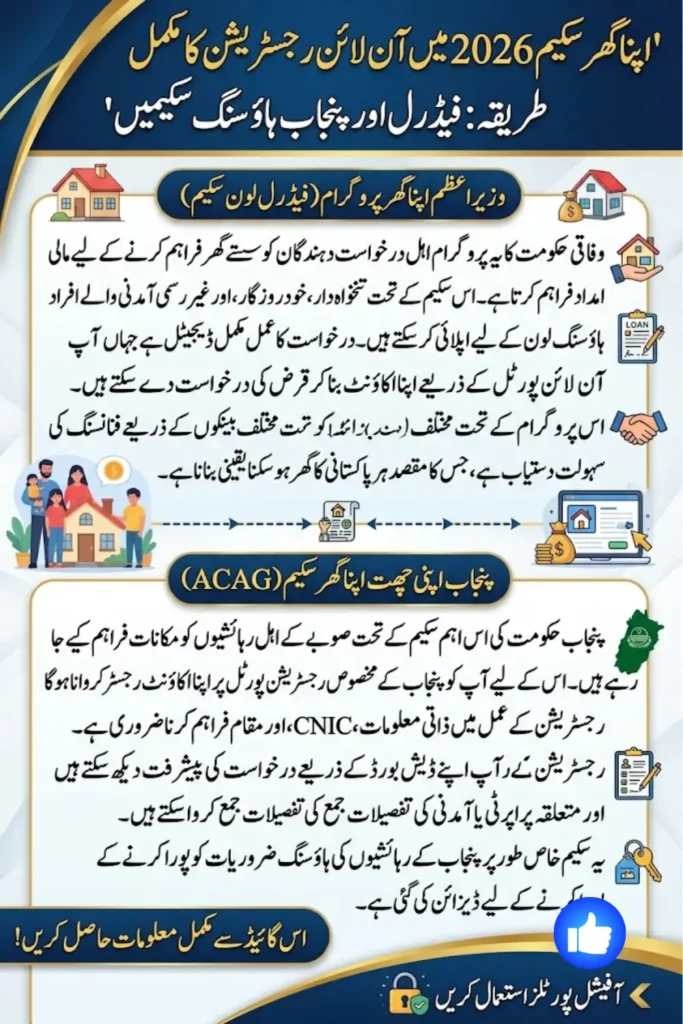
The federal Wazir-e-Azam Apna Ghar Program, also known as “Ghar Ho Tu Apna”, provides a digital platform for eligible applicants interested in the housing loan scheme. On the other hand, residents of Punjab can access the Apni Chhat Apna Ghar (ACAG) programme through its dedicated Punjab registration portal.
This guide explains the registration, login, application, and tracking processes in simple language. It also highlights the information applicants may need when creating an account or submitting their application.
Important: Always use the official government portals when registering for a housing programme. Avoid websites or individuals asking for unnecessary payments or sensitive information.
Apna Ghar Scheme Online Registration 2026 Login – An Overview
The phrase Apna Ghar scheme online registration 2026 login can refer to online access for government housing programmes, but the exact process depends on which scheme you want to apply for.
There are two important programmes covered in this guide:
- Wazir-e-Azam Apna Ghar Program – “Ghar Ho Tu Apna”
This is the federal housing loan programme where applicants can create an account, log in, and apply for a housing loan through the digital application system. - Apni Chhat Apna Ghar (ACAG) Punjab
This is a Punjab government housing initiative. Applicants can register their profile online and later access their dashboard to provide relevant information and check their application progress.
Because these programmes operate through different systems, applicants should first identify the programme that applies to them. This can help prevent confusion during registration and login.
Wazir-e-Azam Apna Ghar Program – Federal Housing Loan Scheme
The Wazir-e-Azam Apna Ghar Program, commonly associated with the “Ghar Ho Tu Apna” initiative, is a federal housing finance programme.
Applicants who want to use the federal housing loan facility can access the programme’s online system to create an account and submit an application. The digital process is designed to make it easier for eligible applicants to provide their information without relying entirely on traditional paper-based procedures.
The application process may be available to different categories of applicants, including:
- Salaried individuals
- Self-employed individuals
- People earning through informal sources of income
According to the information provided, applicants can apply through designated participating banks, including institutions such as Allied Bank and Meezan Bank.
Before starting the process, applicants should make sure that the information they enter is accurate and matches their official documents.
How to Access Apna Ghar Scheme Online Registration 2026 Login
If you are looking for the Apna Ghar scheme online registration 2026 login page for the federal housing programme, you need to access the official Wazir-e-Azam Apna Ghar Program portal.
The general login process involves the following steps:
Step 1: Visit the Official Portal
Start by opening the official online portal of the Wazir-e-Azam Apna Ghar Program. Always check that you are using the correct government website before entering personal information.
Step 2: Open the Login Page
Look for the login or sign-in option on the portal. This will take you to the page where registered users can access their accounts.
Step 3: Enter Your CNIC Number
Provide your CNIC number in the required field. Make sure the number is entered correctly according to your official CNIC document.
Step 4: Enter Your Password
Type the password you created when registering your account. Check the spelling and make sure that the password is entered correctly.
Step 5: Complete the Security Check
The portal may require you to complete a security verification step. Follow the instructions shown on the screen.
Step 6: Access Your Account
After providing the correct login information and completing the security check, you can access your account and continue with the available application options.
If you are a new applicant, you may need to create an account before you can log in.
How New Users Can Register for the Federal Apna Ghar Scheme
People who have not previously created an account will generally need to complete the registration process first.
The basic process can be described as follows:
- Open the official Wazir-e-Azam Apna Ghar Program portal.
- Select the option to create a new account.
- Enter the information requested by the online registration form.
- Complete the account creation process.
- Use your login credentials to sign in.
- Find the “Apply for Loan” option.
- Select the appropriate application category.
- Complete the digital loan application form.
- Review the information carefully before submitting the application.
The exact fields shown on the application page may depend on the applicant’s circumstances and the current requirements of the programme.
It is important to enter truthful and accurate information. Incorrect details may cause problems during the application review process.
Federal Apna Ghar Loan Application for Different Applicants
One of the useful aspects of the federal housing loan application process is that different types of applicants may be able to submit their information through the digital system.
Salaried Applicants
People working in salaried employment may need to provide information related to their employment and income. Applicants should keep relevant financial and identification documents available in case they are requested during the process.
Self-Employed Applicants
Self-employed individuals may also be able to apply through the designated application process. Their income information may be assessed differently from that of salaried applicants.
Applicants with Informal Income
The provided information also indicates an application option for people who earn through informal sources. Such applicants should carefully follow the requirements shown in the online application system.
The federal programme’s loan applications may be processed through designated banks, including Allied Bank and Meezan Bank, as mentioned in the information provided.
Applicants should always check the current requirements of the relevant bank and programme before submitting an application.
Apni Chhat Apna Ghar (ACAG) Punjab Scheme
The Apni Chhat Apna Ghar (ACAG) programme is a separate housing initiative for eligible residents of Punjab.
If you live in Punjab and want to participate in this programme, you can use the official ACAG Punjab registration system to create your profile.
The registration process requires applicants to provide personal and location-related information. After completing registration, users can access their account dashboard and provide additional details related to their application.
The ACAG programme should not be confused with the federal Wazir-e-Azam Apna Ghar Program. Although both initiatives are related to housing, they are separate programmes with their own online portals and application procedures.
Apni Chhat Apna Ghar Online Registration Process
If you are planning to register for the Punjab programme, you can follow the general steps below.
Step 1: Open the Official ACAG Punjab Registration Page
Visit the official registration page for the Apni Chhat Apna Ghar programme.
Make sure that you are using the official government portal and not an unofficial website.
Step 2: Enter Your Full Name
Provide your full name exactly as it appears on your CNIC.
It is important to avoid unnecessary spelling differences because your personal details should match your official identification documents.
Step 3: Enter Your CNIC Number
Enter your CNIC number carefully in the required field.
Double-check the number before continuing with the registration process.
Step 4: Provide Mobile Network Information
The registration form may ask for information about your mobile network. Enter the requested details accurately.
Step 5: Select Your Location and District
Provide your location and district information as requested by the registration portal.
This information helps the programme identify the applicant’s relevant area.
Step 6: Complete Your Registration
Review all the information you have entered. Once everything is correct, complete the registration process according to the instructions displayed on the official portal.
After registration, you may be able to access your account and continue with the next steps.
ACAG Punjab Login and Application Tracking
Once you have registered your profile with the Apni Chhat Apna Ghar programme, you can log in to your account and access your dashboard.
The dashboard can be useful for managing your application information. Depending on the stage of your application, you may be able to:
- Submit property-related information
- Provide income details
- Review your submitted information
- Access your application dashboard
- Track your application status
Applicants should regularly check their account for updates and make sure that any requested information is submitted correctly.
If your application is under review, the dashboard may provide information about its current status or any further action required from you.
Apna Ghar Scheme Online Registration 2026 Login – Common Problems
Applicants may sometimes experience difficulties when registering or logging into a housing programme. Some common issues include the following.
Incorrect CNIC Information
Entering an incorrect CNIC number can prevent you from accessing your account or completing registration.
Always check the number carefully before submitting the form.
Forgotten Password
If you cannot remember your password, look for the password recovery or reset option available on the official portal.
Avoid sharing your password with other people.
Registration Problems
Technical issues or incomplete information can sometimes prevent successful registration. Carefully review each required field before submitting the form.
Security Verification Issues
If the login page includes a security check, make sure you complete it correctly before trying to sign in.
Incorrect Personal Information
Your name and other details should be entered accurately. For ACAG registration, your name should match the information shown on your CNIC.
Incorrect District or Location
Punjab applicants should carefully select the correct location and district during the ACAG registration process.
Providing incorrect information may create problems when the application is reviewed.
Apni Chhat Apna Ghar Helpline and Applicant Support
Applicants who need help with the Apni Chhat Apna Ghar programme can use the provided support channel.
According to the information provided, the ACAG Punjab toll-free helpline is:
0800-09100
If you experience problems with registration, login, application information, or tracking, contacting the official helpline can be a useful way to seek assistance.
It is always better to use official support channels rather than relying on unofficial agents or social media accounts that may provide inaccurate information.
Federal Apna Ghar Program vs Apni Chhat Apna Ghar Punjab
Although both programmes focus on housing, they are not the same initiative.
| Feature | Wazir-e-Azam Apna Ghar Program | Apni Chhat Apna Ghar |
|---|---|---|
| Government level | Federal | Punjab |
| Main focus | Housing loan programme | Punjab housing initiative |
| Online access | Federal programme portal | ACAG Punjab portal |
| Registration | Create an account online | Register a profile online |
| Login | CNIC and password | Access through registered account |
| Application | Use the “Apply for Loan” option | Complete profile and provide required details |
| Tracking | Through the relevant application system | Through the applicant dashboard |
| Support | Programme/bank support channels | Toll-free helpline 0800-09100 |
Applicants should choose the programme that matches their situation and carefully follow the instructions provided on the relevant official portal.
Important Tips Before Apna Ghar Scheme Online Registration 2026 Login
Before beginning your Apna Ghar scheme online registration 2026 login journey, keep these useful tips in mind.
1. Use Official Websites
Always use the official government portal for registration and login. Be careful with websites that copy government programme names or logos.
2. Keep Your CNIC Information Ready
Your CNIC number is an important part of the registration and login process. Keep your identification details available before starting.
3. Use Correct Personal Information
Enter your name and other details exactly as required. For example, ACAG applicants should provide their name according to their CNIC.
4. Provide an Active Mobile Number
Where a mobile number is required, provide accurate information and make sure you can access the number.
5. Protect Your Login Details
Do not share your password or account credentials with strangers or unofficial agents.
6. Check Your Application Before Submission
Review the complete application carefully before submitting it. Correct mistakes as soon as possible if the system allows you to make changes.
7. Track Your Application
After submitting an application, regularly check your dashboard or the relevant official system for updates.
8. Contact Official Support When Needed
If you face a technical or application-related problem, contact the official support service rather than paying an unknown person to resolve the issue.
Frequently Asked Questions
What is the Apna Ghar scheme online registration 2026 login process?
The Apna Ghar scheme online registration 2026 login process depends on the housing programme you want to access. The federal Wazir-e-Azam Apna Ghar Program and Punjab’s Apni Chhat Apna Ghar programme have separate online systems.
How can I log in to the Wazir-e-Azam Apna Ghar Program?
Registered users can access the federal programme’s login page and enter their CNIC number and password. A security verification step may also be required.
How do I apply for a federal Apna Ghar loan online?
New users generally need to create an account first. After logging in, they can select the “Apply for Loan” option and complete the digital application form.
Can self-employed people apply for the federal housing loan programme?
According to the information provided, the digital application process includes options for salaried, self-employed, and informal-income applicants.
Can people with informal income apply?
The provided information indicates that applicants with informal income can also use the relevant application process. Applicants should follow the current requirements shown by the programme or designated bank.
How can Punjab residents register for Apni Chhat Apna Ghar?
Punjab residents can register their profile through the official Apni Chhat Apna Ghar Punjab Registration Page by providing the required personal, CNIC, mobile network, and location information.
What information is needed for ACAG registration?
Applicants are asked to provide details including their full name according to their CNIC, CNIC number, mobile network information, and location or district details.
How can I track my ACAG application?
After registration, applicants can log into their dashboard. The dashboard can be used to submit property and income information and track application progress.
What is the ACAG Punjab helpline number?
The toll-free helpline number provided for the Apni Chhat Apna Ghar programme is 0800-09100.
Final Words
The Apna Ghar scheme online registration 2026 login process can be easier when you first identify the correct housing programme. The federal Wazir-e-Azam Apna Ghar Program provides an online system for housing loan applications, while Punjab residents can use the Apni Chhat Apna Ghar (ACAG) platform for the provincial housing initiative.
For the federal programme, new applicants can create an account, log in with their CNIC and password, and use the “Apply for Loan“ option to begin the digital application process. The information provided also indicates that salaried, self-employed, and informal-income applicants may have relevant application options through designated banks.
For Punjab’s ACAG programme, applicants can register their profiles online by providing their CNIC, personal, mobile network, and location information. After registration, they can use their dashboard to submit relevant property and income details and monitor their application progress.
The most important thing is to use the correct official portal, enter accurate information, and keep your login details secure. If you need assistance with the Punjab programme, you can also contact the provided toll-free helpline at 0800-09100.
By following the correct registration and login process, applicants can manage their housing programme applications more conveniently and stay informed about the progress of their requests.
Apna Ghar Program Application Tracking – How to Track Your Application